An APK file skips the screening store apps get
Android apk sideloading malware is malicious code delivered through an APK file installed directly onto a phone, outside the official app store. Sideloading itself is an ordinary Android feature, useful for beta builds, internal company tools, or software a store won't list. A direct install, though, skips the review a store listing normally goes through, so the only check between the file and the phone is the person doing the tapping.
This pattern exploits that gap. The file does what a store's review would otherwise catch: it asks for permissions a normal app in its category has no reason to need, it runs code that only activates once installed, or it pulls in a second payload after the app has earned enough trust to run in the background.
What we found in 21 sites we analysed
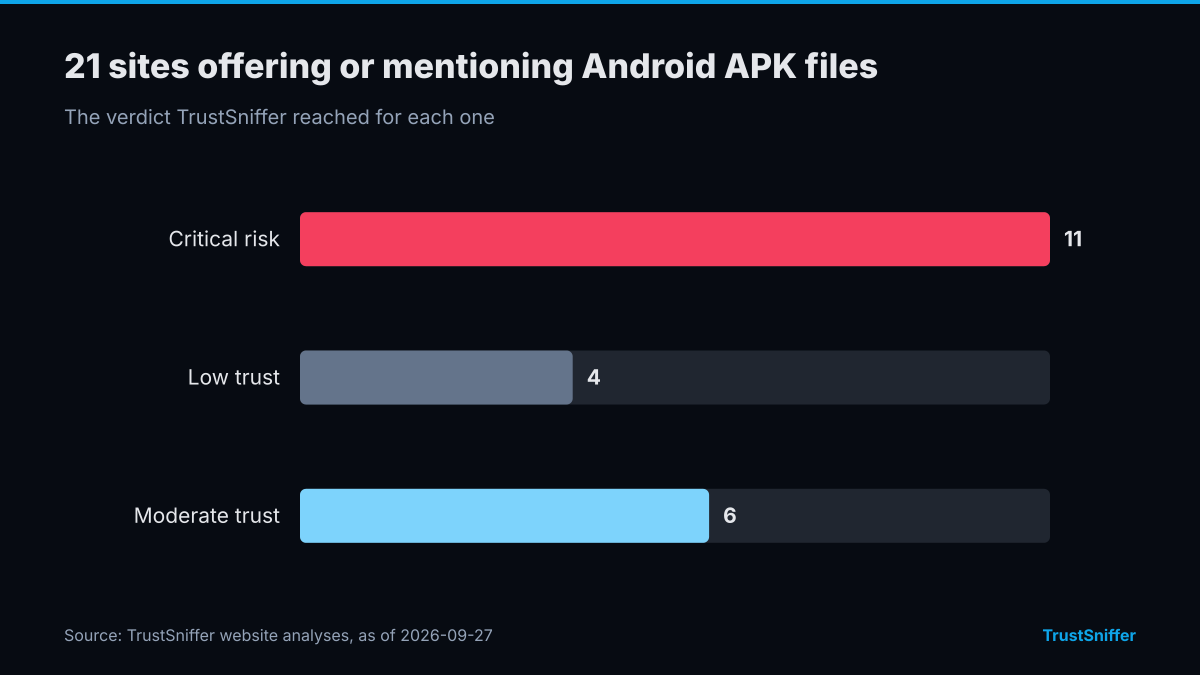
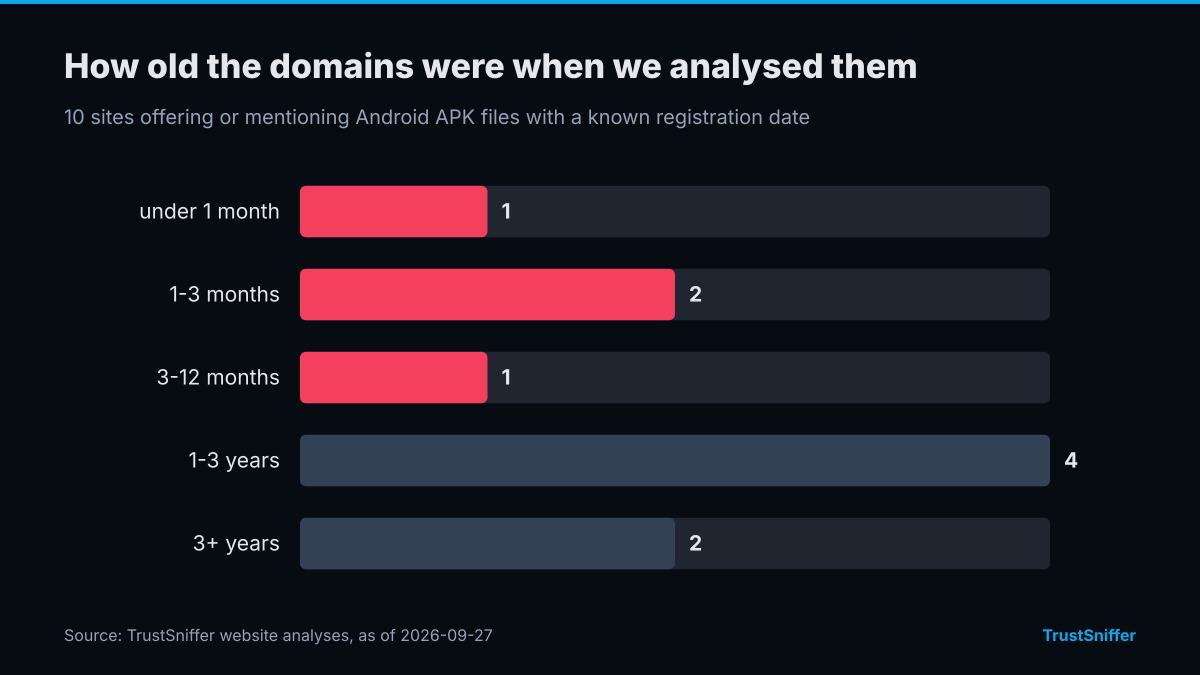
TrustSniffer has analysed 21 sites offering or mentioning Android APK files. 15 of them (71%) were rated critical risk or low trust: 11 critical risk, 4 low trust, 6 moderate trust. 4 of the 10 with a known registration date (40%) had a domain under a year old when we analysed it, and the median age was 1.4 years.
5 of them were registered through DYNADOT LLC. The networks they most often resolved to were Cloudflare, Inc. (13) and IQWeb FZ-LLC (4). 10 of 21 (48%) were already flagged by at least one VirusTotal engine when we checked.
Some of the sites we analysed, each linked to its full report:
- magistv-pro.com.co: rated critical risk (12/100).
A fake update or a cracked app page does the asking
The lure rarely presents itself as an APK download. It shows up as an update notice for an app already on the phone, a mirror offering paid software for free, a mod for a mobile game, or a cracked client repackaged for Android. Cracked game clients and unofficial Minecraft mods tend to follow the same template: the page promises free access to something that is normally paid or restricted, and getting it means leaving the store entirely.
An android apk sideloading scam version of the same page leads with a fake giveaway or access code in place of an update notice, and the steps after the tap stay the same. The person is already looking for something outside the normal channel, so they arrive expecting to override a warning or two. The page trades on that expectation, presenting a bypass of Android's own friction as a routine step in getting the file.
Disposable domains and a password on the archive
The infrastructure behind the download page is meant to be thrown away. A domain is registered cheaply, often on a short, unfamiliar extension, hosts the page for a short run, and is abandoned once it starts appearing on blacklists. A new one replaces it with the same layout under a different name. Blacklists that rely on a domain's track record miss these sites by design, because there usually isn't a track record to check yet.
Many of these pages hand over the APK inside a password-protected archive, with the password printed on the page. That step alone defeats scanners that check a file automatically at the point of download: the scanner sees only an encrypted archive and never reaches the APK inside. The person opening the archive by hand ends up doing the one thing a scanner could not do for them.
Anyone who wants an app without waiting
The audience is defined by a moment: someone wants an app, a mod, or an update right away and will skip a step to get it. That includes people chasing free access to paid software, players looking for game mods a store won't carry, and people who get a message saying an app they already use needs an urgent update outside the store. The target doesn't need to be careless or unsophisticated, only to have one plausible reason to sideload something.
What the page looks like before the install prompt
Before the APK reaches the phone, check the page and the file for these signs.
Running the domain through a website checker before downloading anything gives a trust score built from these signals, which is more reliable than judging how convincing the page looks. TrustSniffer has published analyses for 5,314 websites at the time of writing, and the same scoring sits behind the current Risk Index for anyone comparing a suspicious link against the broader picture. If the sideloaded app also asks for a wallet connection or a seed phrase, check that wallet separately: TrustSniffer has assessed 17,419 cryptocurrency wallet addresses, and a wallet screen takes a minute.
Plenty of legitimate software is distributed as a sideloaded APK, so the method alone proves nothing. The warning sign is the pattern above: a disposable domain, an archive opened by hand with a password from the page, and permission requests that don't match what the app claims to do. Check the link before you tap.
- The domain is new, sits on an unfamiliar extension, and has no content beyond the download itself.
- The page instructs the user to enable installs from unknown sources as if that were a routine step.
- The file arrives in a password-protected archive with the password printed on the same page.
- The app requests accessibility, SMS, or overlay permissions with no obvious link to what it claims to do.
- There is no listing for the same app on the official store to compare it against.