What phishing and credential theft means
A crypto phishing site is a webpage built to look like a real wallet, exchange, or dApp login screen, but its only job is to collect your credentials or your seed phrase. This is credential theft: the attacker does not need to break into your device, they just need you to type your details into a form they control.
A fake wallet login page is one of the most common versions of this attack, because a wallet's login screen is the single gate between an attacker and everything inside it. Unlike a stolen password on an ordinary account, a stolen wallet credential often lets the attacker move funds immediately, and crypto transactions are hard or impossible to reverse once sent.
What we found in 41 sites we analysed
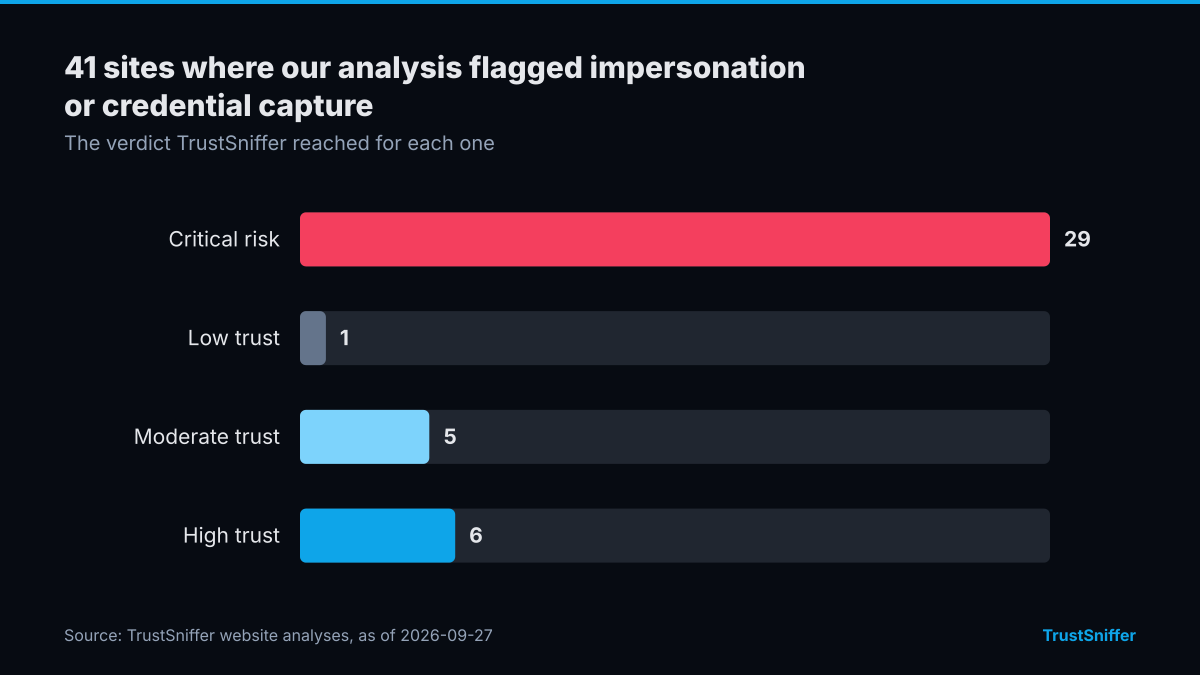
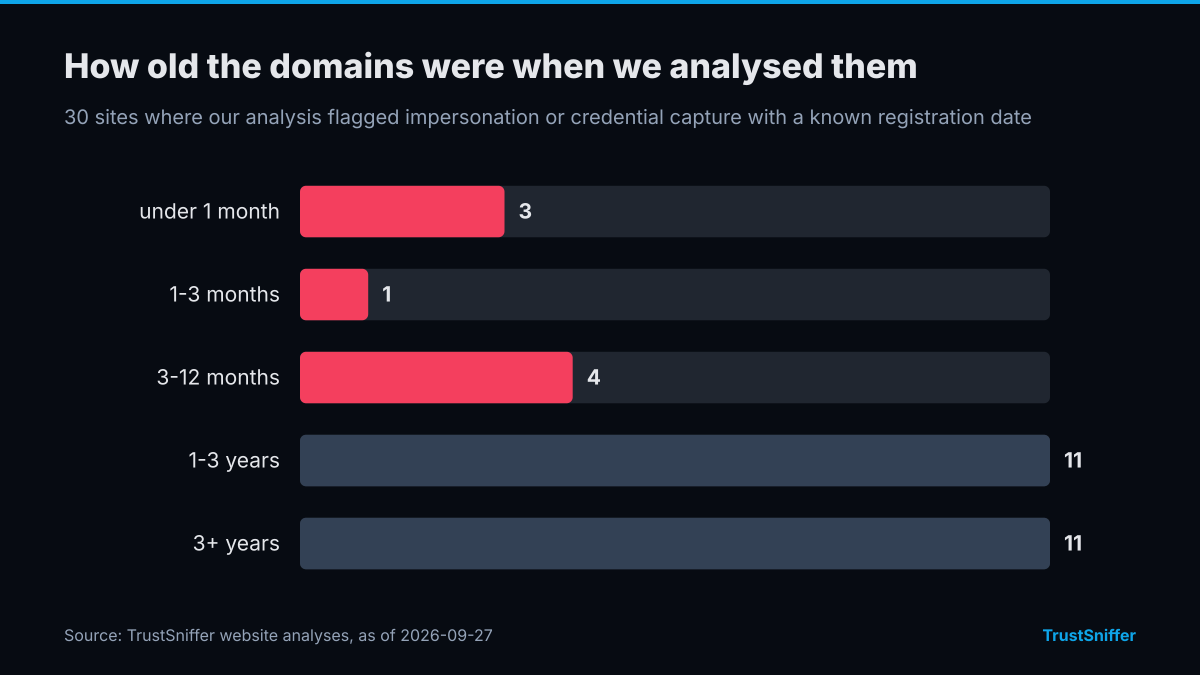
TrustSniffer has analysed 41 sites where our analysis flagged impersonation or credential capture. 30 of them (73%) were rated critical risk or low trust: 29 critical risk, 1 low trust, 5 moderate trust, 6 high trust. 8 of the 30 with a known registration date (27%) had a domain under a year old when we analysed it, and the median age was 2.2 years.
The networks they most often resolved to were Cloudflare, Inc. (15) and Amazon, Inc. (5). 17 of 41 (41%) were already flagged by at least one VirusTotal engine when we checked.
Some of the sites we analysed, each linked to its full report:
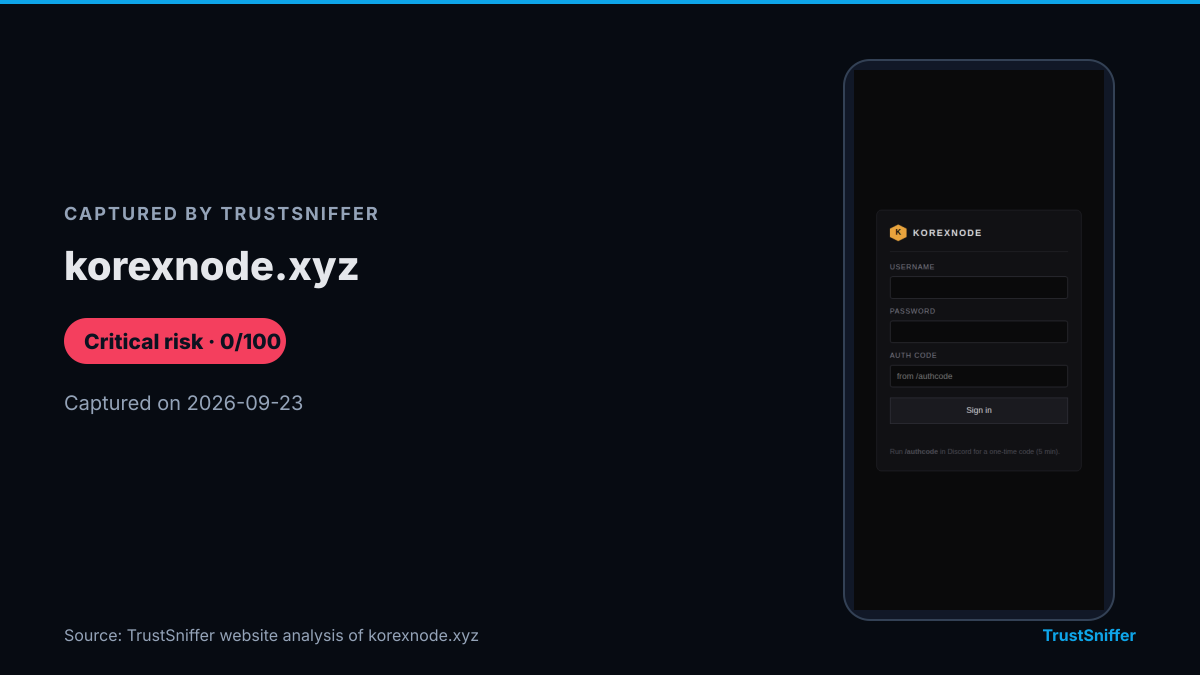
- korexnode.xyz: rated critical risk (0/100), domain under a month old when analysed.
- convertesvale.com.br: rated critical risk (2/100), domain 3 months old when analysed.
- exoticinvest.ltd: rated critical risk (0/100), domain 4 months old when analysed.
- aussiegiftcard.com: rated critical risk (0/100), domain 11.6 years old when analysed.
How it works in practice
Most of these attacks start somewhere ordinary: a sponsored search result, a direct message on social media, a comment under a legitimate project's post, or an email claiming your account needs urgent verification. The link leads to a page that copies the layout, logos, and sometimes even the URL structure of a real service closely enough to pass a quick glance.
Once you land on it, the page asks for exactly what the attacker wants: a password, a two-factor code, or the words of your recovery phrase, entered directly into a box instead of confirmed on a hardware device you actually control. There is no hacking involved at that point. The moment those details are submitted, they go straight to the attacker, who can log in or move funds before you notice anything is wrong.
Warning signs to look for
Phishing pages are built to be convincing, but they tend to share the same handful of tells.
- The web address is almost right but not exact: an extra word, a swapped letter, or a different domain ending than the service you expect.
- You are asked to type your recovery phrase or private key into a website at all. No legitimate wallet interface ever needs that.
- The link arrived through an unsolicited message, comment, or ad rather than a bookmark or an official app you installed yourself.
- The page pushes urgency: a limited-time claim, a supposedly locked account, or a warning that you must act within minutes.
- Small visual details are off: a stretched logo, a layout that breaks on mobile, or a login box that looks pasted onto an otherwise normal page.
What to do if you are targeted
If you realise you are on a suspicious page, close it without entering anything further and do not submit a form you have already started filling in. If you already typed a password, change it immediately on the real site, using a link you type yourself or a saved bookmark, not the one you just clicked.
If you entered a recovery phrase or private key, treat that wallet as compromised. Any funds still in it should be moved to a new wallet with a fresh phrase as soon as possible, because whoever received your details can act at any time, and waiting only gives them a longer window. Before you trust a login page, exchange, or wallet interface with your details in the first place, it is worth running it through a website checker that inspects a site the way an analyst would, rather than trusting the design alone.
How TrustSniffer checks for this
TrustSniffer's website analysis looks at a site's ownership, hosting, age, and behaviour to judge whether it matches the pattern of an established, legitimately operated service or the pattern of a page built to harvest credentials. TrustSniffer has published analyses for 5287 websites, building a picture of what genuine services look like next to the pages that copy them.
Wallet addresses get their own path: because a phishing operation or wallet drainer needs somewhere to send what it collects, TrustSniffer has assessed 17160 cryptocurrency wallet addresses tied to that kind of activity. If you want to check a login page before you use it, the website checker is the place to start. If you want to see whether an address tied to a transaction or a giveaway has a troubling history, the wallet checker covers that, and pages and addresses already flagged sit in the sanctions directory.