What 5,314 Website Reports Keep Turning Up
A page on a free hosting subdomain is not automatically a scam, but the setup turns up often across the 5,314 website reports TrustSniffer has published: a page on a free-tier platform, one click removed from the brand it is imitating. The appeal is structural. A free-tier host issues a valid HTTPS certificate automatically, so the padlock looks the same as it would on any legitimate site. Signup asks for little more than an email address, with no business verification.
Blacklists struggle with this setup for a structural reason, not a technical one. The underlying platform hosts enormous numbers of ordinary, legitimate pages, so blocking the shared root domain outright would take down all of them along with the handful that are malicious. Automated filters are built to avoid that kind of collateral damage, which means an abusive subpage usually has to be reported and removed one at a time. By the time that happens, a near-identical page has often already gone up under a different free account, sometimes on a different platform entirely.
What we found in 15 sites we analysed
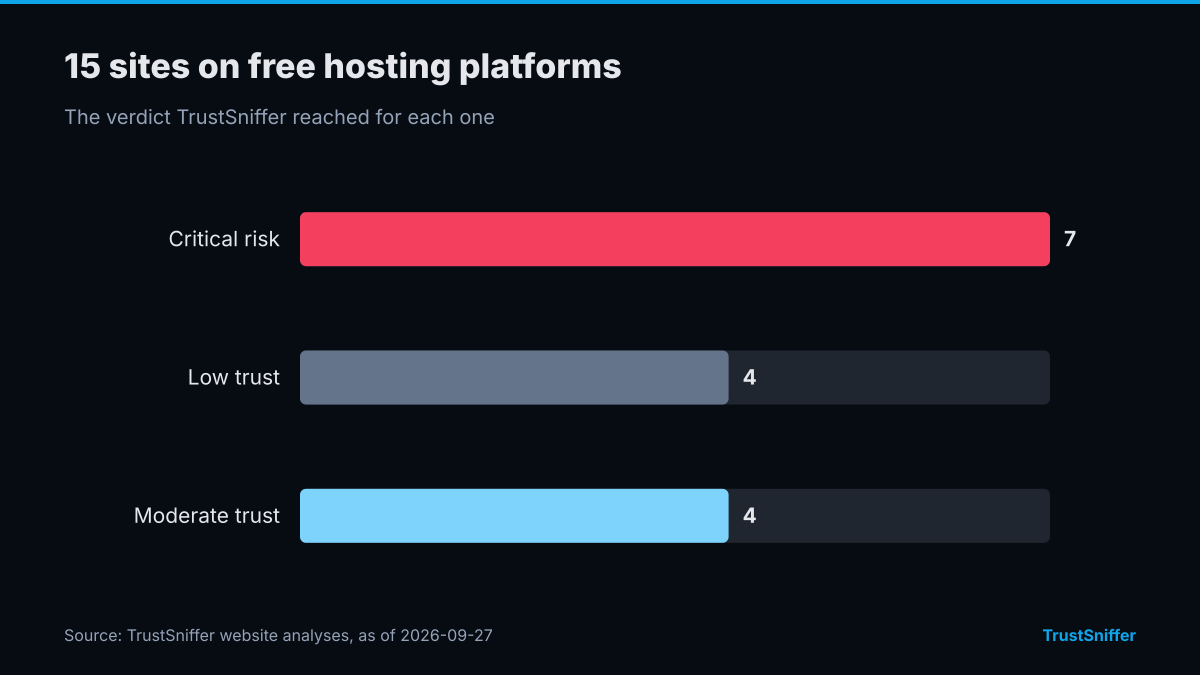
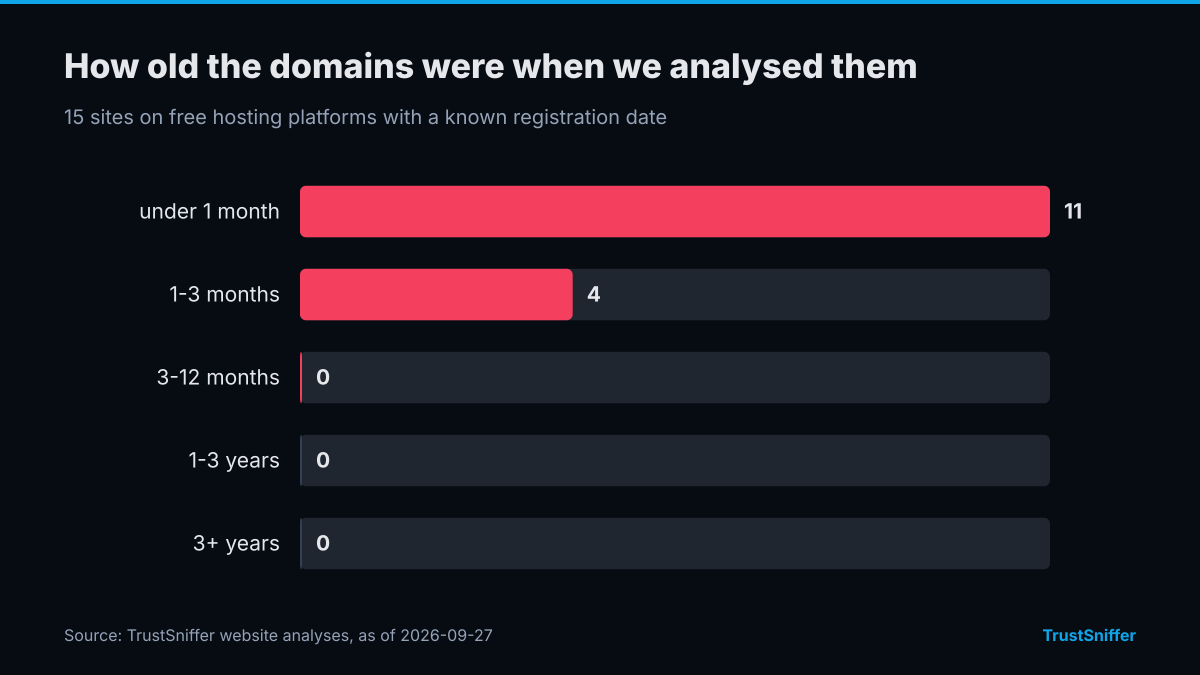
TrustSniffer has analysed 15 sites on free hosting platforms. 11 of them (73%) were rated critical risk or low trust: 7 critical risk, 4 low trust, 4 moderate trust. 15 of the 15 with a known registration date (100%) had a domain under a year old when we analysed it, and the median age was under a month.
The networks they most often resolved to were Cloudflare, Inc. (13). 15 of 15 (100%) were already flagged by at least one VirusTotal engine when we checked.
Some of the sites we analysed, each linked to its full report:
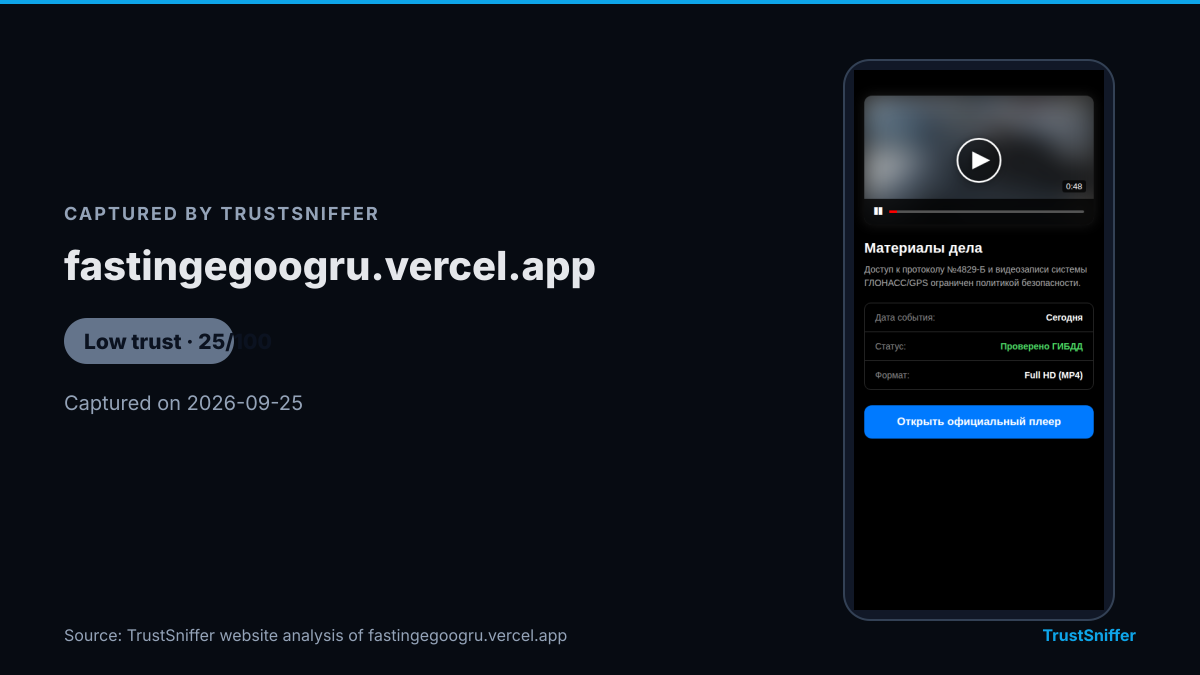
- fastingegoogru.vercel.app: rated low trust (25/100), domain under a month old when analysed.
- proishestviyagoodru.vercel.app: rated critical risk (20/100), domain under a month old when analysed.
- pub-309aaffb1a3643d58aaa9c444941fef3.r2.dev: rated low trust (40/100), domain under a month old when analysed.
- pub-0216fa08b2b94e129cb9e002cf7cb1f4.r2.dev: rated critical risk (5/100), domain under a month old when analysed.
The Download Page Built to Look Temporary
The page itself rarely tries to look permanent. It borrows the name of a well-known piece of software, a popular game, or a familiar brand, and it matches the wording and layout closely enough that a quick glance does not raise questions. Where it differs from the real thing is usually the address bar: the page lives on a subdomain that belongs to the hosting platform, not to the brand it is imitating. It only needs to survive long enough to collect a handful of downloads before the hosting account is suspended, at which point an operator with a saved template and a new free account can be back online within the hour. That short lifespan is itself a form of defense. By the time a report is filed and reviewed, the page under review is often already gone, and the operator has moved on to the next one.
One Archive, Several Ways to Infect a Device
What sits behind the download link varies, but a handful of shapes come up repeatedly across free hosting abuse cases.
- A password-protected archive, so the antivirus engine scanning the page cannot open the file it is actually delivering
- A small script dropper, which looks harmless on its own and only fetches the real payload after the page has already passed an automated scan
- A direct executable file offered in place of a link to an official app store or the software vendor's own site
- An Android APK offered for sideloading, which requires a user to turn off a phone's built-in protections before it will install
- A Java .jar file, which runs the same way across operating systems and does not always trigger the warnings a Windows .exe would
Cracked Games and Sideloaded Apps Are Prime Targets
Some audiences are easier to reach than others. Anyone looking for a cracked game client, a Minecraft mod, or a pirated copy of paid software has usually already been told, somewhere in a forum post or a video, to disable antivirus or ignore a security warning for the download to 'work.' That instruction does the attacker's job before the file is even opened, since the person downloading it has been primed to override their own defenses. The same pattern shows up with anyone sideloading an Android APK outside an official app store: the act of sideloading itself means deliberately bypassing a protection that would otherwise flag an unfamiliar file. Neither group is careless. Both have simply been trained, by the communities they rely on, to treat a security warning as an obstacle rather than a signal.
What to Check Before You Trust the Download Link
A handful of details separate an ordinary page on free hosting from one built to deliver malware.
None of these on their own proves a page is malicious, but a page carrying two or three of them is worth checking before anything gets opened. Running the link through TrustSniffer's website checker is one way to do that before you download anything. If the same page also asks for payment in cryptocurrency, for an 'unlock fee' or something similar, TrustSniffer's wallet checker draws on the 17,419 wallet addresses it has assessed so far to flag one already tied to known risk, and the sanctions directory is a second place to check whether the address or the entity behind it already appears among flagged listings.
- The link sits on a shared subdomain rather than the brand's own root domain
- The file is locked inside a password-protected archive, with the password supplied separately from the download itself
- The page asks you to disable antivirus or browser protections before the download will work
- There is no evidence the publisher exists anywhere outside this one page
- Reviews or comments praising the download appear only on the same page, not on any independent site