What the term means
Free website builders malware is not one virus or one file. It is a distribution pattern: someone uses a free, no-code website or hosting tool, the same kind of tool anyone might use to launch a hobby blog or a small business page, to publish a page that hands visitors a malicious file instead of the software, mod, or media they came looking for. The building tool itself is ordinary. What changes is the intent of whoever built the page on top of it.
Security teams describe versions of this pattern as fake download pages, trojanized installers, or drive-by distribution. What they have in common is a reliance on tools that are free to sign up for, fast to publish on, and do not require a purchased domain or any hosting history before a page can go live and start receiving visitors from search or social links.
What we found in 15 sites we analysed
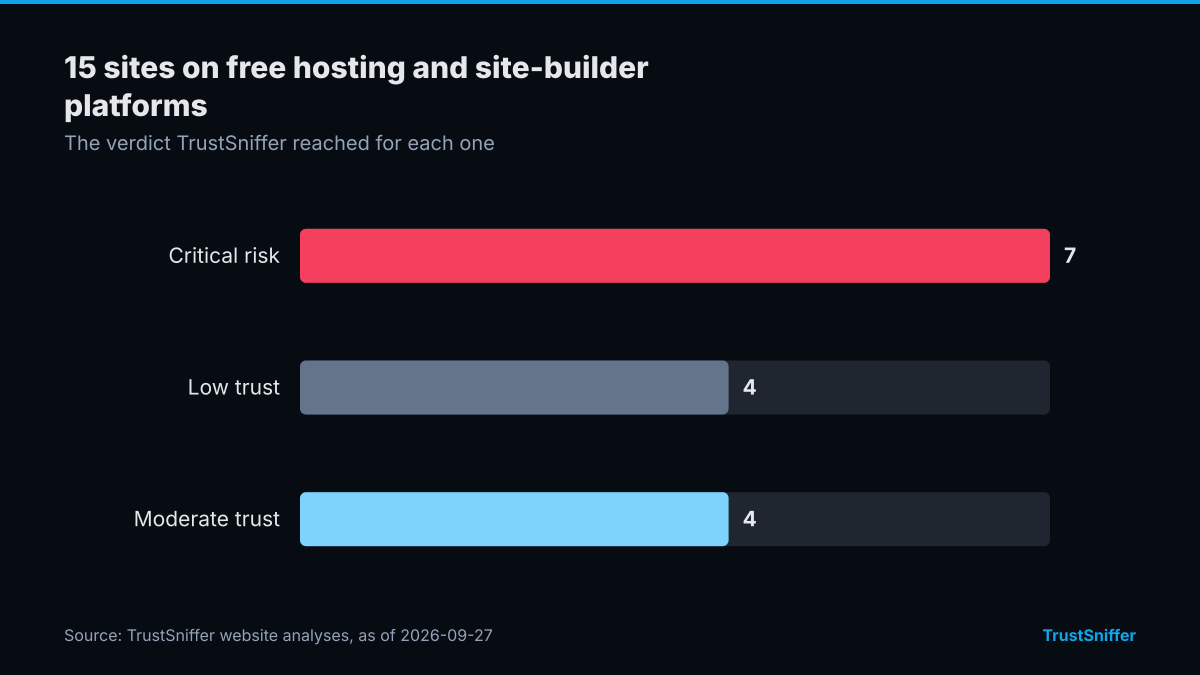
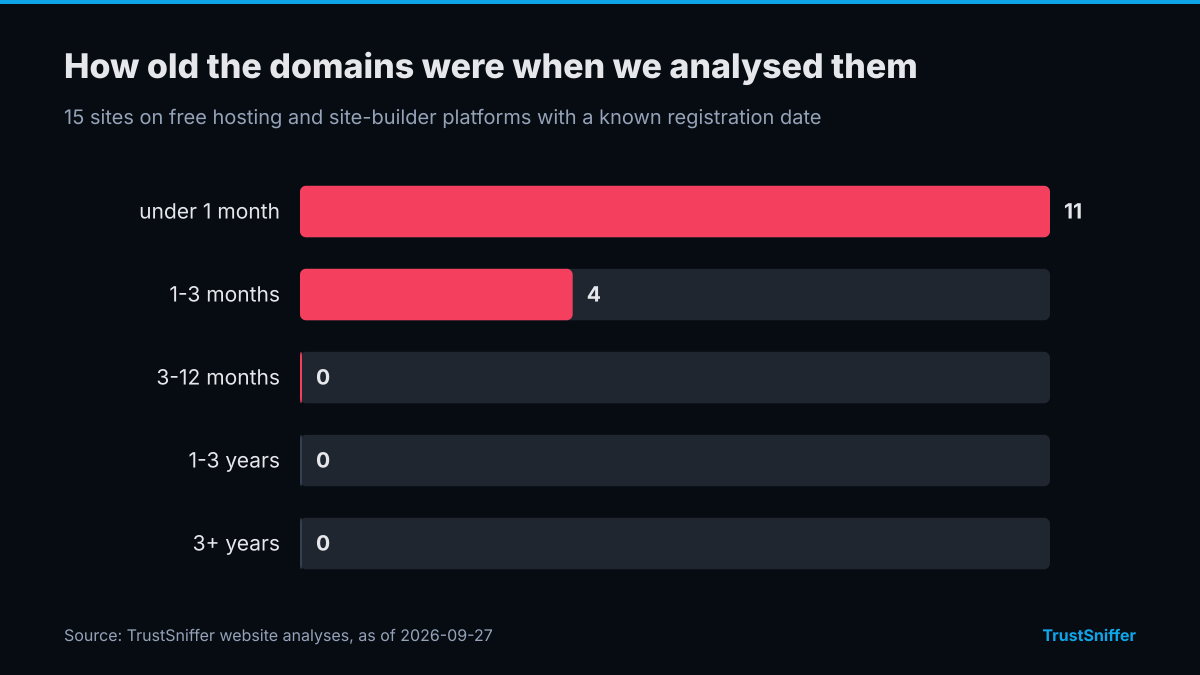
TrustSniffer has analysed 15 sites on free hosting and site-builder platforms. 11 of them (73%) were rated critical risk or low trust: 7 critical risk, 4 low trust, 4 moderate trust. 15 of the 15 with a known registration date (100%) had a domain under a year old when we analysed it, and the median age was under a month.
The networks they most often resolved to were Cloudflare, Inc. (13). 15 of 15 (100%) were already flagged by at least one VirusTotal engine when we checked.
Some of the sites we analysed, each linked to its full report:
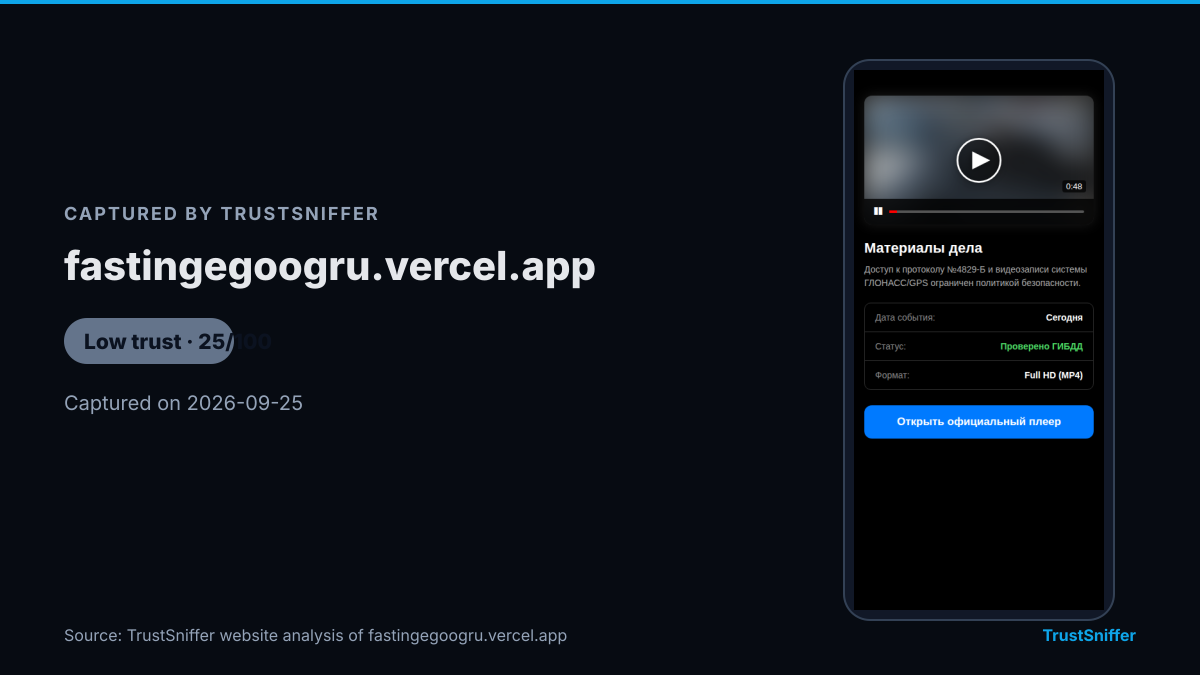
- fastingegoogru.vercel.app: rated low trust (25/100), domain under a month old when analysed.
- proishestviyagoodru.vercel.app: rated critical risk (20/100), domain under a month old when analysed.
- pub-309aaffb1a3643d58aaa9c444941fef3.r2.dev: rated low trust (40/100), domain under a month old when analysed.
- pub-0216fa08b2b94e129cb9e002cf7cb1f4.r2.dev: rated critical risk (5/100), domain under a month old when analysed.
How it works in practice
The page usually presents itself as a download source for something people actively search for: a cracked version of paid software, a mod for a popular game, or a mobile app that isn't available through an official store. The design borrows the visual language of a genuine download site, sometimes closely, because building that look costs nothing extra on a free platform.
The actual delivery method varies, but it tends to fall into a small set of formats:
Because the hosting tool is free and reusable, a page that gets taken down can be replaced with a near-identical one in minutes, often at a new address. That churn is part of why this pattern is hard to blacklist your way out of: the list of bad addresses is always a step behind the list of new ones.
- a direct executable offered in place of the program you expected
- a password-protected archive, which stops many scanners from inspecting the contents before you open the file
- an app package offered for sideloading outside an official store
- a script that, once run, downloads and installs a second payload
- a bundled installer for a real, unrelated tool used to mask a malicious file riding alongside it
Warning signs to look for
None of these signs alone proves a page is malicious, but several together are worth stopping for:
- the address doesn't match the software, mod, or brand it claims to offer
- the page pushes urgency: a countdown, a warning that the link expires, or repeated download buttons
- the download is a compressed archive with the password printed right there on the page
- you're asked to turn off a security prompt or scanner before the file will run
- there's no version history, changelog, or about page, just a download button
- the site is brand new despite claiming to be an established tool or community
What to do if you are targeted
If you catch the page before downloading anything, close the tab and do not run the file. Checking the address first with a website checker before you click through gives you an independent read on the page instead of relying on how convincing it looks.
If you already ran the file, disconnect the device from the network, run a full scan with updated security software, and change passwords for accounts you use on that device, starting with anything reused elsewhere. If the page asked you to pay or send cryptocurrency to unlock a download, run the destination address through the wallet checker before sending anything further, and treat any address already flagged as a reason to stop. Previously identified cases are browsable in the sanctions directory.
Report the page to the platform that hosts it if you can identify the host, since free builder platforms generally have abuse-reporting processes for exactly this kind of misuse.
How TrustSniffer checks for this
TrustSniffer scores a website's trust from 0 to 100, where 100 reflects the strongest evidence of legitimate operation. That is different from a risk score: a high number here is reassuring, not alarming. Sites land in one of four bands, High Trust (75-100), Moderate Trust (50-74), Low Trust (25-49), or Critical Risk (0-24), depending on what our analysis finds, and a small number get Needs Review instead of a score when the site blocks automated access or returns too little content to judge.
That scoring draws on a growing base of first-party analysis: TrustSniffer has published analyses for 5,305 websites at the time of writing. On the crypto side of the same problem, where free-builder download pages sometimes ask for payment in cryptocurrency to unlock a file, TrustSniffer has assessed 17,160 cryptocurrency wallet addresses. Both checks are free to run before you click a download link or send a payment, at the website checker and the wallet checker.