What the Java .jar download scam is
A Java .jar file is not a passive document, it is a packaged program, and the moment you open one it can run any instruction its author wrote. In this scam pattern, someone convinces you to download a .jar file that presents itself as a game mod, a cracked application, or a small utility, and it relies on the fact that most people can't tell a legitimate Java package from a malicious one just by looking at it.
The trick doesn't need a code flaw to work. It only needs you to treat a file you found outside an official source the same way you'd treat any program you meant to install, then run it.
What we found in 42 sites we analysed
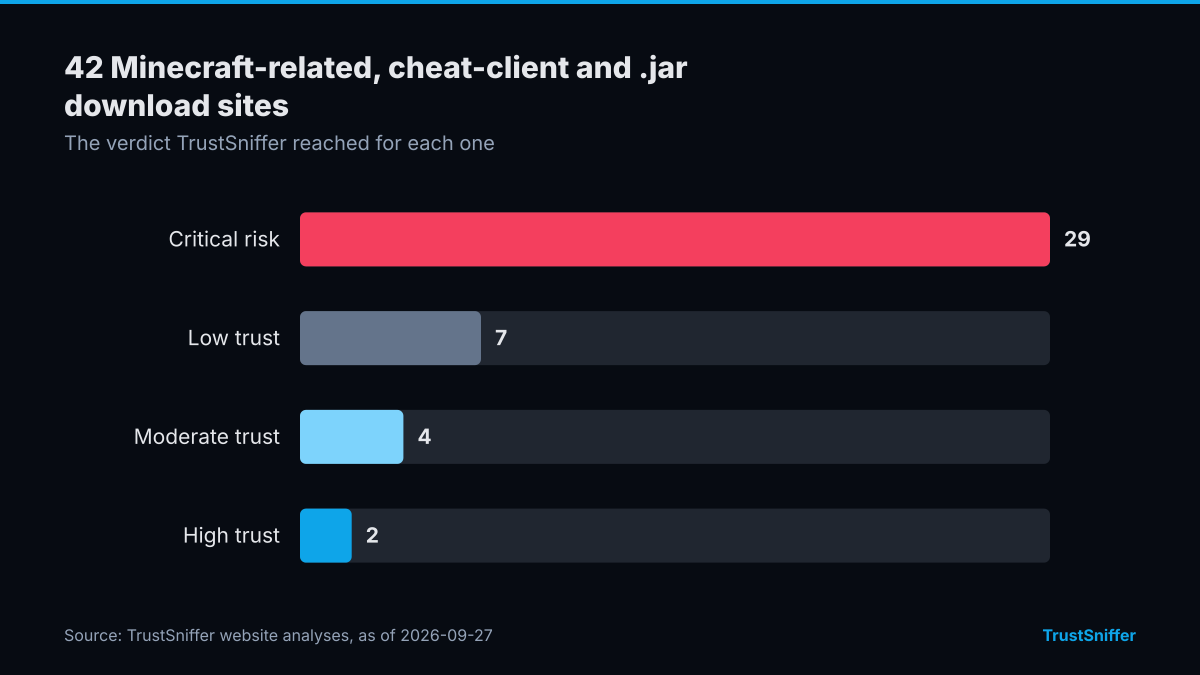
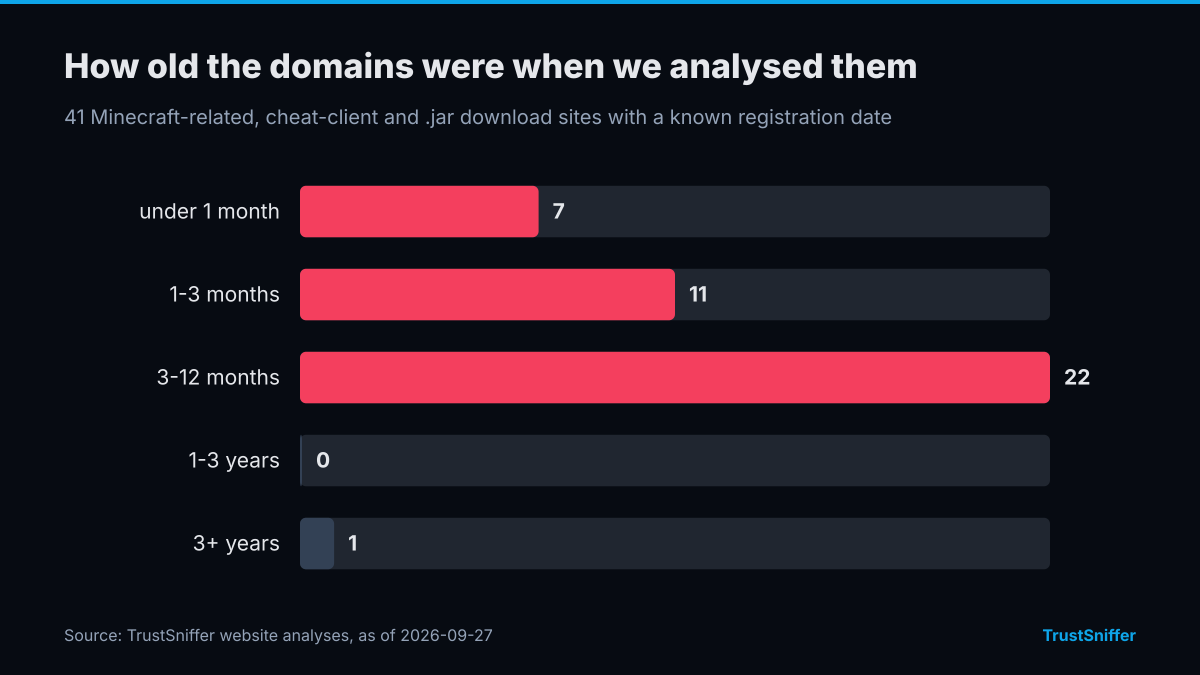
TrustSniffer has analysed 42 Minecraft-related, cheat-client and .jar download sites. 36 of them (86%) were rated critical risk or low trust: 29 critical risk, 7 low trust, 4 moderate trust, 2 high trust. 40 of the 41 with a known registration date (98%) had a domain under a year old when we analysed it, and the median age was 4 months.
26 of them were registered through Web Commerce Communications Limited / WebNic. The networks they most often resolved to were FEMO IT SOLUTIONS LIMITED (14) and Cloudflare, Inc. (13). 32 of 42 (76%) were already flagged by at least one VirusTotal engine when we checked.
Some of the sites we analysed, each linked to its full report:
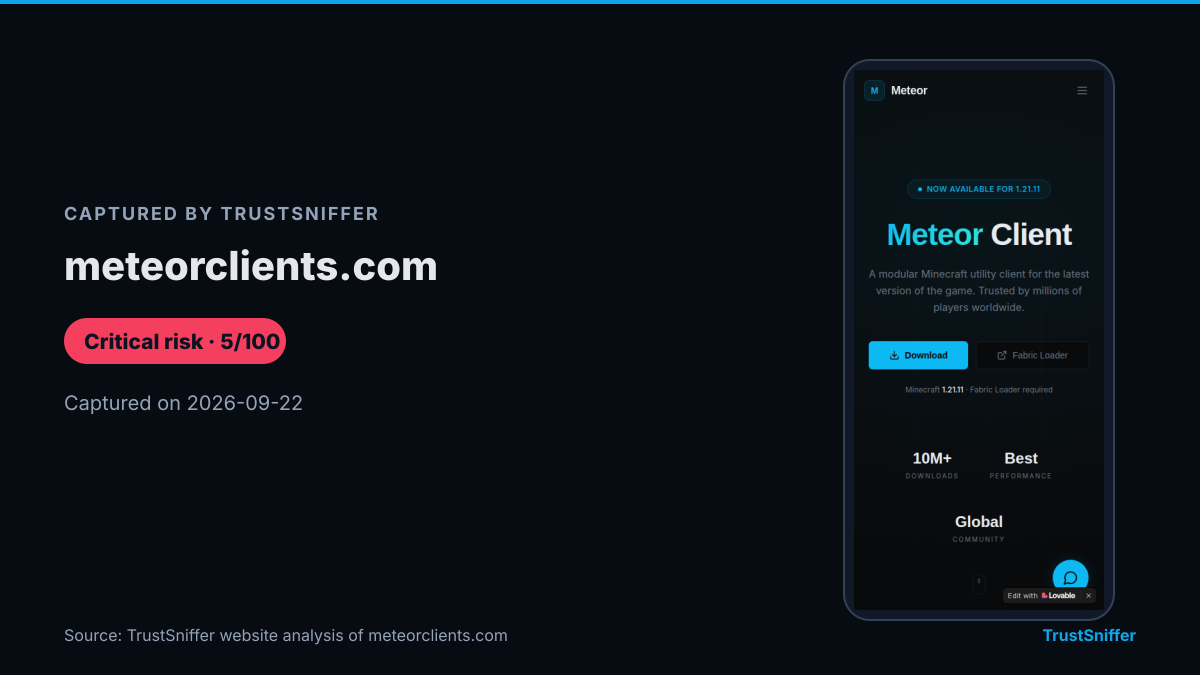
- meteorclients.com: rated critical risk (5/100), domain 6 months old when analysed.
- cheetoclient.com: rated critical risk (0/100), domain 5 months old when analysed.
- breezeclient.com: rated critical risk (0/100), domain 5 months old when analysed.
- polinexclient.org: rated critical risk (0/100), domain 5 months old when analysed.
How the download chain works
The pattern usually starts on a page built to look like a download mirror, a modding community, or a small tool repository. Instead of linking to an official project page, it offers a single .jar as the entire installer, which is unusual: most legitimate Java software ships with a proper installer, a signed package, or clear publisher information, not a bare file.
Some of these pages wrap the download in a password-protected archive, with the password given only on the page itself. That step also happens to stop many antivirus tools from scanning the contents until after you've extracted them.
Once opened, the .jar can behave as a script dropper: a small first-stage program whose only job is to quietly fetch and run a second payload from elsewhere. Because that first stage may do very little on its own, it can look unremarkable even to someone who checks the download before running it.
Warning signs to look for
A few details tend to separate a genuine Java download from one built to deliver malware.
- It's offered as a bare, direct download rather than a link to the official project or publisher's page.
- The page asks you to disable antivirus software or ignore a browser security warning before the file will open.
- The download is locked in a password-protected archive, with the password supplied only on that same page.
- The domain uses a cheap, short-lived extension such as .icu, .cyou, .sbs, .rest, .space, .shop, .click, or .link instead of the project's usual address.
- The page is built around a high-demand search like a cracked game client or a Minecraft mod rather than describing what the tool actually does.
What to do if you're targeted
If you haven't opened the file yet, don't. Delete it and look up the software's official source instead of trusting whatever link brought you to the download. Running the source page through a website checker before you download anything is a quick way to see whether it shares patterns with sites already scored as low trust.
If you already ran the .jar, disconnect the device from your network and run a full antivirus scan. Treat any password typed on that machine afterward as compromised until you've changed it from a separate, clean device, and if a crypto wallet was involved, check its address with a wallet checker before trusting it again.
How TrustSniffer checks for this
TrustSniffer's scoring draws on a growing first-party base: TrustSniffer has published analyses for 5,274 websites and assessed 17,168 cryptocurrency wallet addresses. That comparison base is what lets a download page get flagged when it shares patterns with sites already placed in the Low Trust or Critical Risk bands, rather than being judged on a single detail in isolation.
Before you open any .jar file or install anything a page hands you, run the source through our website checker, or see how these patterns show up across the sites we've reviewed in the Risk Index.