The offer
The pitch is a sponsorship: a known brand wants to work with your channel, the payout is generous, and all you need to do is apply. We did not see how visitors reach the two pages below, but both are written for creators, and both were captured by our analysis in early November 2026.
collaboration-campaign.info copies Grammarly's website, pricing table included, and adds one button: "Join Grammarly collaboration program It's free". The partner sign-up promises to verify that you own your YouTube channel through a Google sign-in. mediatime-partners.com presents itself as a sponsorship marketplace called Media Time: "Find sponsors for your YouTube channel", a box for your channel handle, and floating cards advertising campaigns from NordVPN, Razer and Adobe with payouts such as "+$2,400 paid out". It names no company, address or licence.
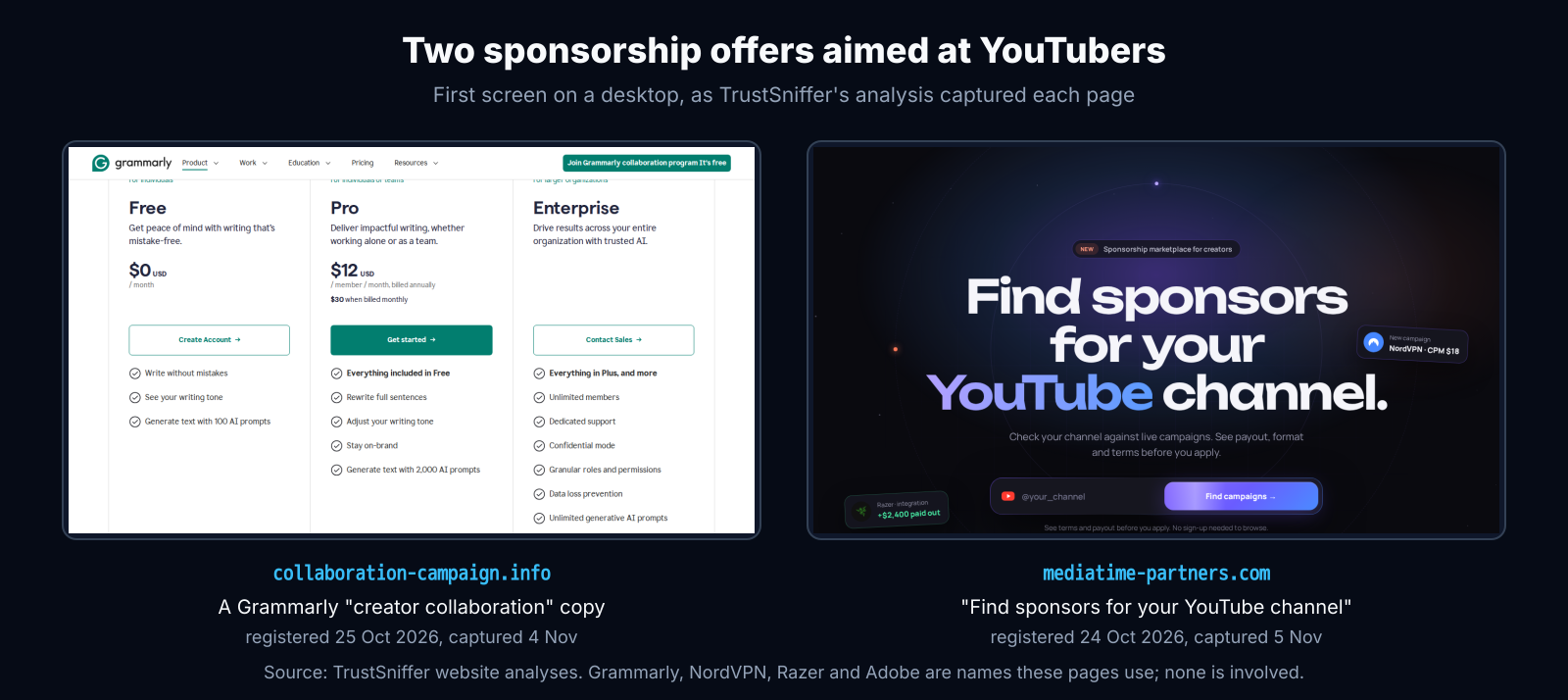
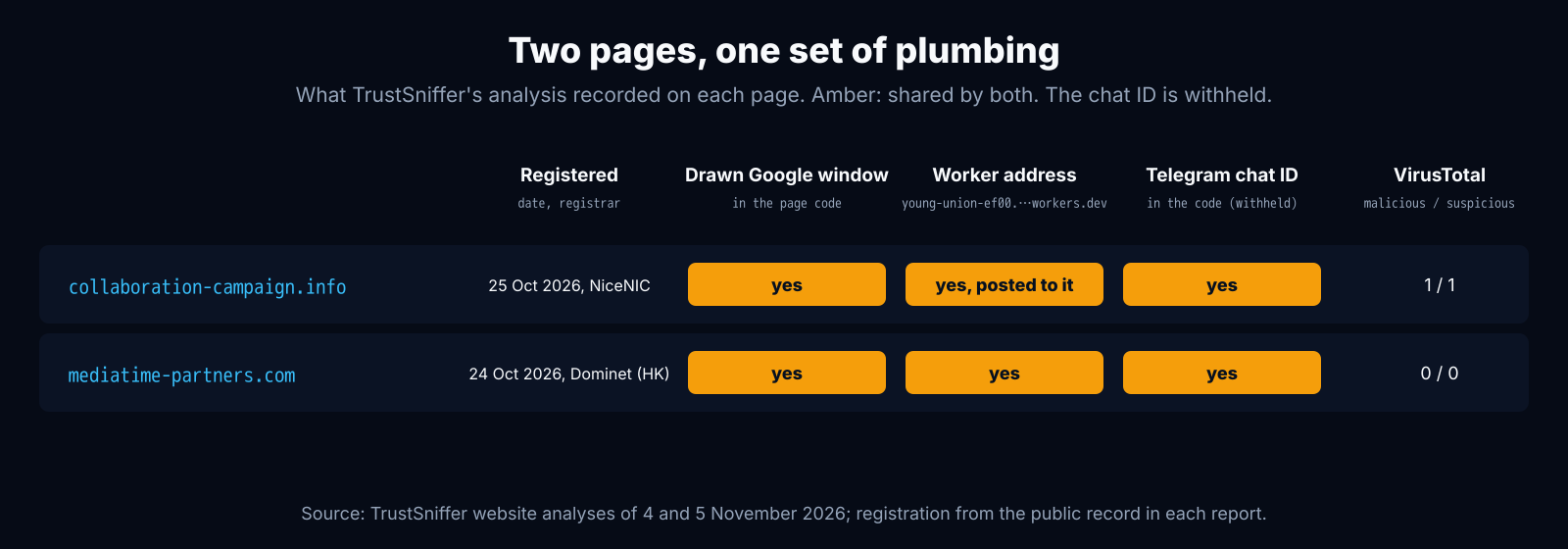
Both domains were brand new. collaboration-campaign.info was registered on 25 October 2026 with NiceNIC and mediatime-partners.com on 24 October 2026 with Dominet (HK), ten and twelve days before we captured them. TrustSniffer rates both Critical, at 0 out of 100.
The window that is part of the page
The trick is known as "browser in the browser". When a real site lets you sign in with Google, your browser opens a new window that belongs to Google, at Google's own address. A fake one skips that step: the page draws something that looks like that window inside itself, and you type your Google password into the page.
On collaboration-campaign.info the whole window is in the page's own HTML. The title bar is a block of the page with a Chrome logo drawn in SVG and the words "Sign in - Google Accounts". The minimise, maximise and close buttons are typed characters (—, □ and ✕). The address bar is plain text reading "accounts.google.com/v3/signin/identifier?continue=…" next to a drawn padlock. The sign-in form inside it is loaded from collaboration-campaign.info itself, at a path carrying an ID made for each visitor.
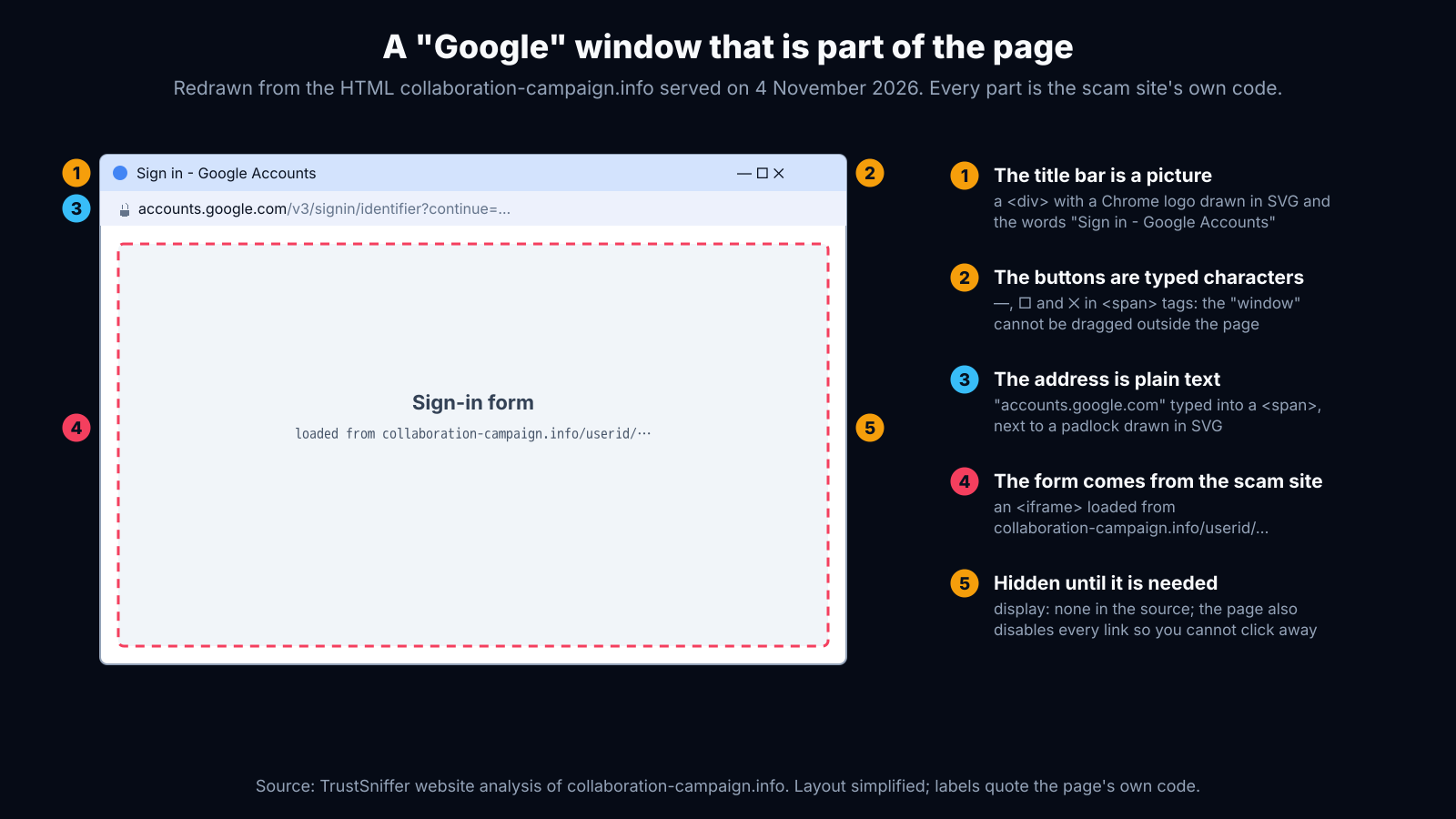
This is what those parts look like in the source, quoted as served (long values shortened):
<div id="window" style="position: fixed; top: 10px; z-index: 1000000; ... display: none;">
  <span id="logo-description">Sign in - Google Accounts</span>
  <span id="minimize">—</span> <span id="square">□</span> <span id="exit">✕</span>
  <span id="domain-name">accounts.google.com</span>
  <span id="domain-path">/v3/signin/identifier?continue=https%3A%2F%2Faccounts.google.com%2F...</span>
  <iframe id="content" src="https://collaboration-campaign.info/userid/..."></iframe>
</div>
The window starts hidden ("display: none") and appears only when the page decides to show it. Two more pieces of the same page matter. One script attaches a click handler that cancels every link on the page (it calls preventDefault on each click), most likely so a visitor cannot leave once the window is up. Another waits two seconds, looks up the visitor's public IP address through ipify and posts it, with the words "report_visit", to api.php on the same site.
How we caught it, and why VirusTotal saw almost nothing
TrustSniffer's sandbox opens a page in a real browser and searches the page's code, and every frame inside it, for a sign-in window drawn by the page itself: a provider's sign-in title or address that is not served by that provider. On both sites it found a "Sign in - Google Accounts" window in code served by the site's own address. Every quote and the figure above come from collaboration-campaign.info; on mediatime-partners.com the detection matched the same window markers, and we have not published its markup here. The window was not on screen when we captured either page; it is the source that gives it away.
External reputation services had little to say. When we analysed them, VirusTotal showed one engine calling collaboration-campaign.info malicious and one suspicious, and none at all for mediatime-partners.com: zero malicious, zero suspicious. A page can be brand new, carry a credential trap in its code and still look clean to the lists a browser checks.
The two pages are also tied to each other. Both carry the same Cloudflare Worker address (listed in full in the indicators below) and the same Telegram chat ID in their code, and collaboration-campaign.info also sent a POST request to that Worker while we watched; our capture records where it went, not what it carried. The account label in a Worker address is chosen by whoever opened the account and is not evidence of anyone's identity. A Telegram chat ID in a page's code is where a bot can deliver what visitors type; we do not publish it. Our report on the airdrop drainer kit explains what a Worker address is and why one links pages.
How to tell a real sign-in window from a fake
- Drag it. Grab the window by its title bar and pull it past the edge of your browser. A real sign-in window is a separate window of your computer and moves freely. A drawn one stops at the edge of the page, or does not move at all.
- Let your password manager decide. A password manager fills your Google password only on Google's real address. If it offers nothing in a "Google" window, do not type the password yourself.
- On a phone, expect a page, not a pop-up. A real Google sign-in opens as a new tab or a full page at accounts.google.com, shown in your browser's own address bar. A box with its own little address bar floating over the page is a drawing.
- Go to the brand, not the link. A real sponsorship comes from the brand's own domain or a known agency, and never needs your Google password to "verify" a channel. Find the brand's partnership page yourself and ask them.
- Check the page first. Paste the link into the TrustSniffer website checker before you sign in to anything. Our guide to phishing and credential theft covers the wider pattern.
A sign-in method that cannot be typed into the wrong page also protects you when you miss the signs. A passkey or a hardware security key only works on Google's real address, so a drawn window has nothing to capture. Codes sent by text message do not have that protection: a fake page can ask for the code and pass it on while it is still valid.
If you already signed in through one of these windows, change your Google password from a device you trust, open Google's security checkup and sign out of every session you do not recognise, then check YouTube Studio for managers or owners you did not add. Google's account recovery and YouTube's creator support can help if you have already lost access. You can report a phishing page to Google through Safe Browsing's report form, and an account pretending to be a brand on YouTube under its impersonation policy.
For security teams: indicators
# Pages (both rated Critical by TrustSniffer)
collaboration-campaign.info      registered 2026-10-25, NiceNIC
mediatime-partners.com           registered 2026-10-24, Dominet (HK)

# Worker address in both pages' code; collaboration-campaign.info posted to it
# (the account label is chosen by the account holder; not an identity)
young-union-ef00.mortoncharlie529.workers.dev

# Behaviour on collaboration-campaign.info
GET  https://api64.ipify.org?format=json      (visitor IP), then
POST ./api.php  {"action":"report_visit", ...}  after 2 s
iframe src: /userid/<per-visitor id>          (form inside the drawn window)
script blocks every link click (click handler with preventDefault)

# Static markers of the drawn window
<span id="logo-description">Sign in - Google Accounts</span>
<span id="domain-name">accounts.google.com</span>  (text inside a page, not a browser address)
Report the domains to their registrars, named above and in each TrustSniffer report, and the Worker through Cloudflare's abuse reporting. Link the report as evidence. Brands whose names are used, here Grammarly, NordVPN, Razer and Adobe, can warn creators faster than anyone. Every report we publish is in the directory, and the Risk Index shows how our verdicts split.


